

Google’s AI subscription lineup went through its biggest overhaul yet at Google I/O 2026 in May. What was once a single AI Premium tier has expanded into four plans: a free tier, Google AI Plus, Google AI Pro, and now two versions of Google AI Ultra — one at $100/month and one at $200/month. The changes affect pricing, usage limits, storage bundles, and which exclusive features you can access.
If you have not revisited your Google subscription since last year, the plan you signed up for may look quite different today — or may no longer be the best fit for what you actually use.
This article breaks down every current tier, what each one gets you, and which type of user each plan actually makes sense for.
The free plan
Google’s free AI tier is more capable than it used to be. Free users get 32K token context instead of the 1M token context available to paid subscribers, and there is no access to NotebookLM Plus or premium credits for Flow and Whisk video and image generation tools.
The free plan works if you use Gemini occasionally for quick tasks or already pay for another AI assistant and just want a secondary option. It will fall short for anyone regularly doing research-heavy, creative, or productivity-focused work.
Google AI Plus — $7.99/month
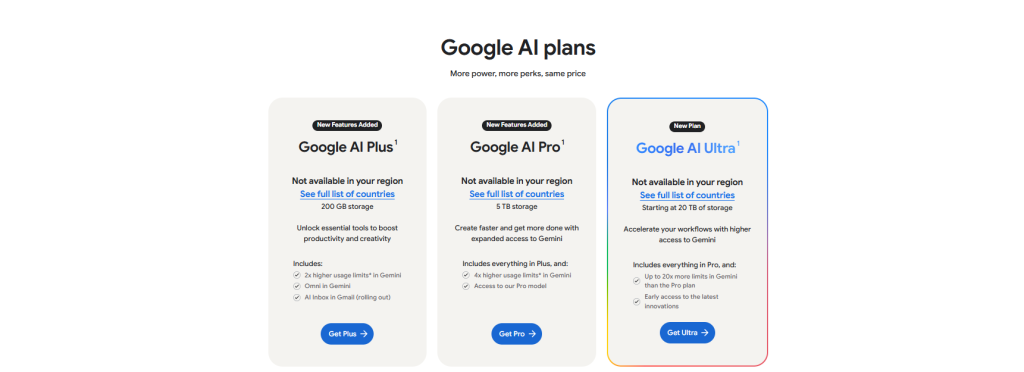
Google AI Plus is a sub-$10 AI subscription from a major vendor that includes a full AI model (Gemini 3 Pro, capped), 200 GB of cloud storage, and video generation.
Beyond the AI model itself, the plan bundles 200 GB of cloud storage and supports family sharing, allowing the primary account holder to extend benefits to up to five other family members. That family-sharing angle makes it a particularly strong value if you want to get a household off the free tier without spending heavily.
AI Plus is not designed for power users. It carries lower usage limits than Pro and does not include the deeper Workspace integrations, full Deep Research access, or premium video generation credits that come with higher tiers. But for a casual or light user who wants more than the free tier provides, it is the most affordable entry point in the market right now.
Who Google AI Plus is for: Casual users, students, families on a budget, or anyone who primarily needs storage and basic Gemini access.
Google AI Pro — $19.99/month
This plan remains the sweet spot for everyday power users. The $19.99 monthly price includes 5 TB of Google One storage — Google bumped this from 2 TB to 5 TB on April 1, 2026, with no price change. If you already pay for Google One at $9.99/month for 2 TB, the effective cost of upgrading to Pro (which includes the storage bump and full AI access) is only about $10/month more.
Google AI Pro subscriptions now include the YouTube Premium Lite plan at no extra charge, which reduces ads on most videos. The plan also includes Google Home Premium access.
On the AI side, Pro gives you access to:
- Gemini’s full model lineup with higher usage limits than Plus,
- Deep Research,
- Expanded NotebookLM access
- Gemini integrations across Workspace apps like Gmail, Docs, and Drive.
Usage is now compute-based rather than a fixed daily prompt count, refreshing every five hours until you reach your weekly limit. More complex prompts — including extended thinking, Deep Think, media generation, and Deep Research — consume more usage and will reach your limit faster.
Who Google AI Pro is for: Professionals, researchers, content creators, and heavy Gemini users who want the best everyday AI access without paying for enterprise-level features.
Google AI Ultra — $99.99/month
Google launched this new tier at I/O 2026, specifically targeting developers, technical leads, knowledge workers, and advanced creators. It includes:
- A 5x higher usage limit in the Gemini app compared to the Pro plan
- 20 TB of cloud storage, a YouTube Premium individual plan,
- Priority access to Google Antigravity, and
- Gemini 3.5 Flash for testing and debugging.
- Access to Gemini Spark, Google’s new 24/7 AI agent that can take action across Google products on a user’s behalf.
The $99.99 Ultra tier does not include Project Genie or Project Mariner — those remain exclusive to the $199.99 tier. That distinction matters. If you are evaluating this plan primarily for agentic or world-building features, you will need to step up.
At $99.99, Google now mirrors the exact price tier occupied by Anthropic Claude Max and OpenAI’s Pro sub-tiers , creating a three-way face-off at each price point. The right choice between them depends entirely on your workflow and which AI ecosystem you are already in.
Who Google AI Ultra is for: Developers, technical leads, and advanced creators who need significantly more compute than Pro offers, but do not require the exclusive agentic features locked to the $199.99 tier.
Which plans give users API credits by default?
Google AI Pro and AI Ultra subscriptions for personal Google Accounts.
Google AI Pro comes with $10 in monthly credits from the Google Developer Program. These credits apply to API usage in Google AI Studio or Google Cloud.
Google AI Ultra comes with $40 in monthly Google Cloud credits
Which Google AI plan should you actually pay for?
The answer depends almost entirely on how intensively you use AI tools.
If you are a casual user who wants more than the free tier, AI Plus at $7.99 is a reasonable starting point — especially if you plan to share it with family.
If you use Gemini daily for writing, research, or productivity work, AI Pro at $19.99 is the clearest value play in the lineup, particularly since the 5 TB storage bundle effectively offsets much of the cost if you already pay for Google One.
The $100 Ultra tier targets a specific gap: users who regularly hit Pro’s limits but do not need the browser agent or world-building features locked to the $200 plan. If you are a developer or power creator who lives in Gemini and Google’s tooling, it is worth evaluating seriously.
The $200 tier is for a small subset of users. If you are not sure whether you need it, you probably do not.
from TechCabal https://ift.tt/6wFLR3j
via IFTTT

I am the CEO of 9JAGISTLAND.My name is Adedeji Timothy and my co-owner is Oyekola Damilare.This blog is born out of our passion to educating to people in all aspect of internet life.We are enthusiastic about writing posts and articles online.
Write your views on this post and share it. ConversionConversion EmoticonEmoticon